The Essential Schema Markup Types for Fitness Brands and Businesses

Schema markup makes it easier for search engines to parse, understand, and display your content. The more details you provide, the richer your results, and the more likely people are to click through.
Also, note that schema isn’t a magic bullet that will automatically supercharge your organic visibility. But without it, your website will find it harder to show up for relevant queries.
When someone searches “gyms near me” or “best protein powder,” Google provides a wide range of information besides just answers. It shows star ratings, business hours, prices, event dates, and detailed snippets that answer questions before anyone clicks.
That’s schema markup at work.
Schema markup is code that tells Google exactly what your content means. Without it, Google has to guess whether “10-52.5 lbs” is a price, a weight range, or something else entirely.
With it, your fitness business can appear in rich results with enhanced features that make you stand out from competitors stuck with plain blue links.
Below, we’ve listed 11 types of schema markup that matter most for fitness businesses including gyms, personal trainers, supplement brands, equipment retailers, and fitness content creators. For each type, you’ll learn what it does, when to use it, and how to implement it correctly.
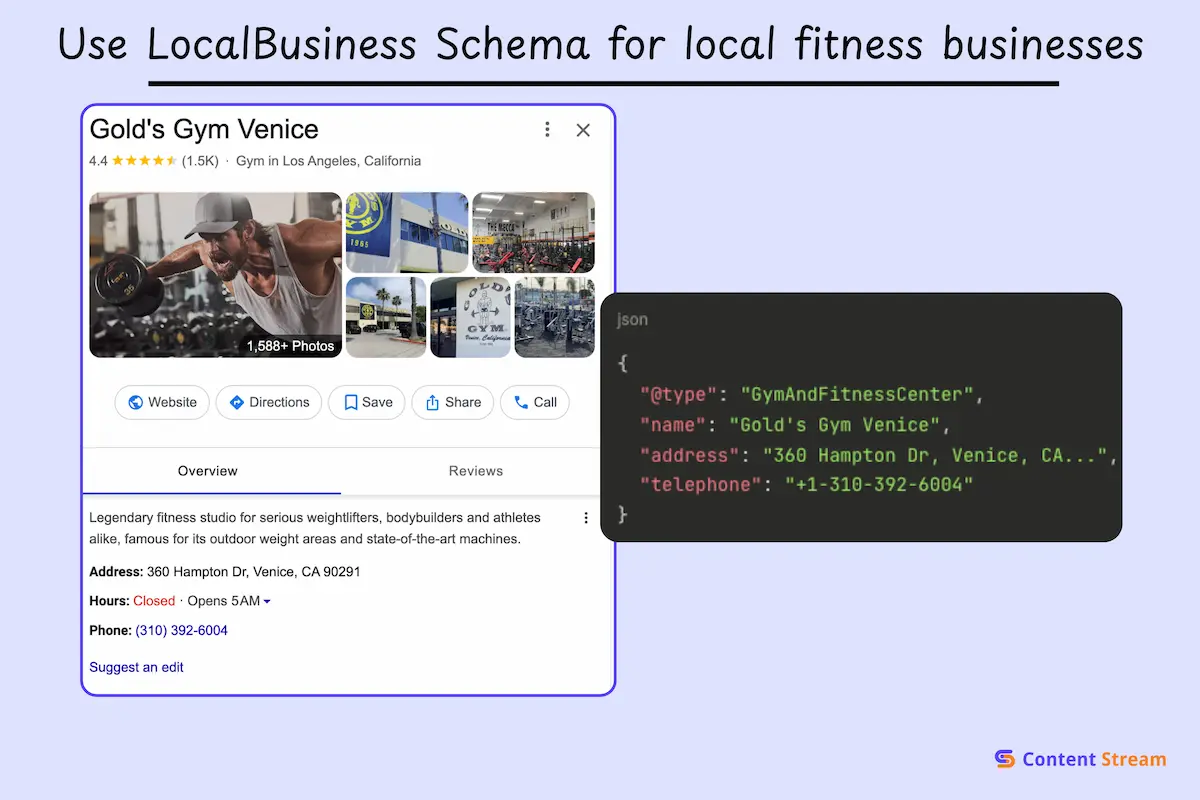
LocalBusiness schema is a structured data type that defines basic information for your fitness business, like name, address, phone number, address, and even business category. It’s critical for physical businesses including fitness gyms, yoga studios, CrossFit boxes, martial arts dojos, and any fitness business with a physical location.
This schema type tells Google you’re a legitimate local business at a specific location and makes it easier for your business to shop up in Google results, Maps, local pack results, and Knowledge Panels.
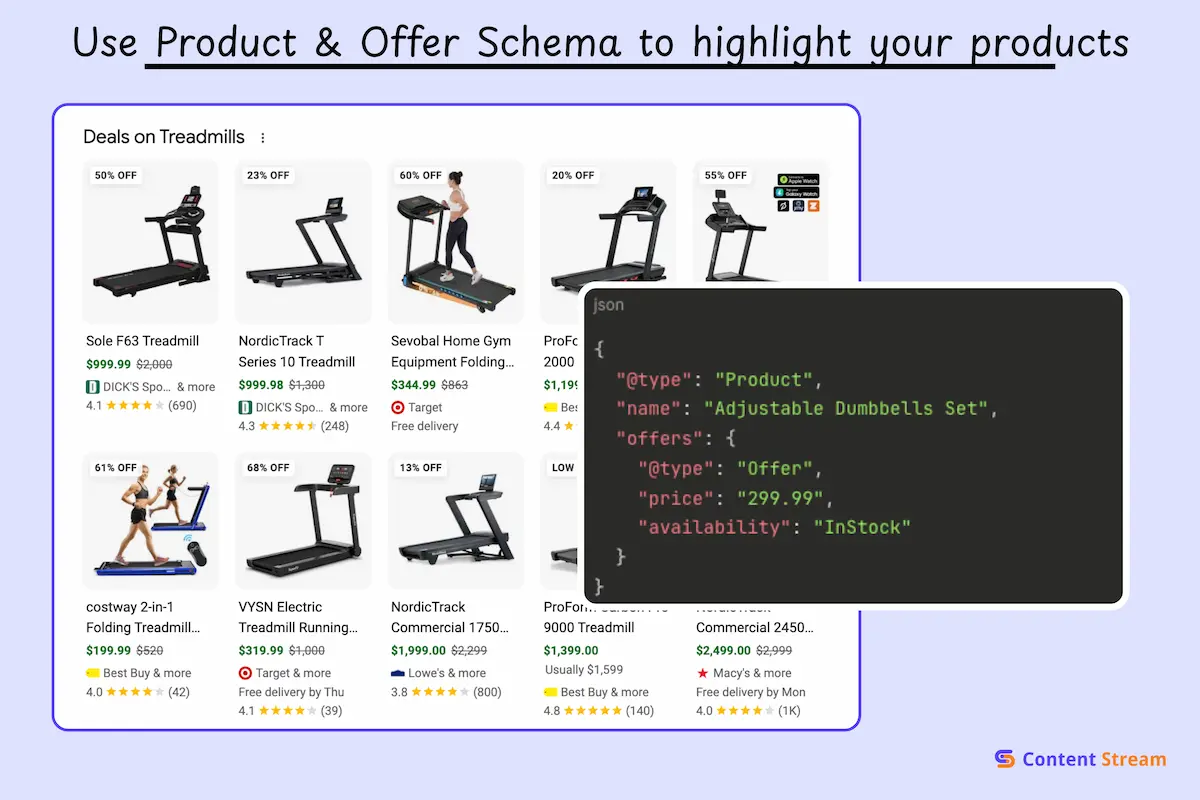
Product & Offer Schema type marks up individual products or services you sell, including their price, availability, condition, and special offers. It is for fitness businesses that sell products like memberships, supplements, equipment, apparel, or any packaged service.
It tells Google:
This is what powers product cards that appear in search results, prices and “in stock” labels.
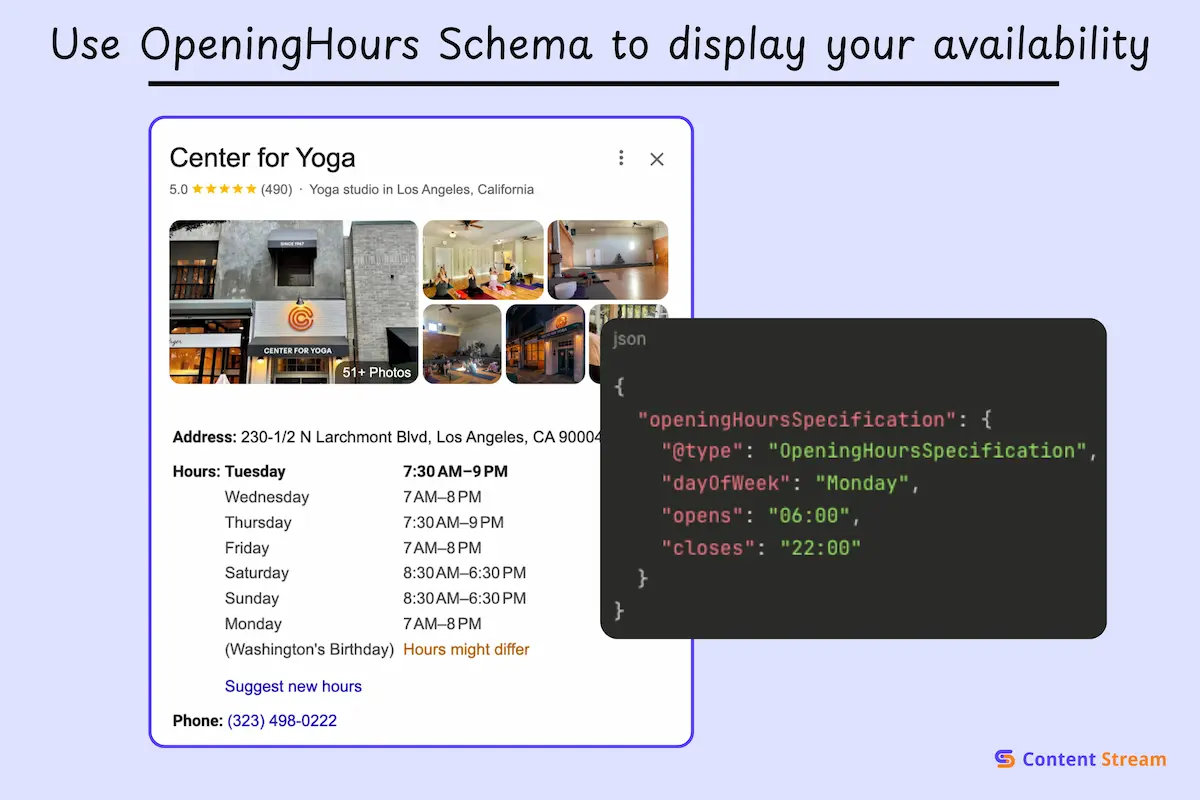
OpeningHours schema provides information that Google uses to display your business hours directly in search results, Maps listings, and voice assistant responses when people ask “Is [your gym] open right now?”
Like LocalBusiness Schema, it matters for any fitness facility with set operating hours.
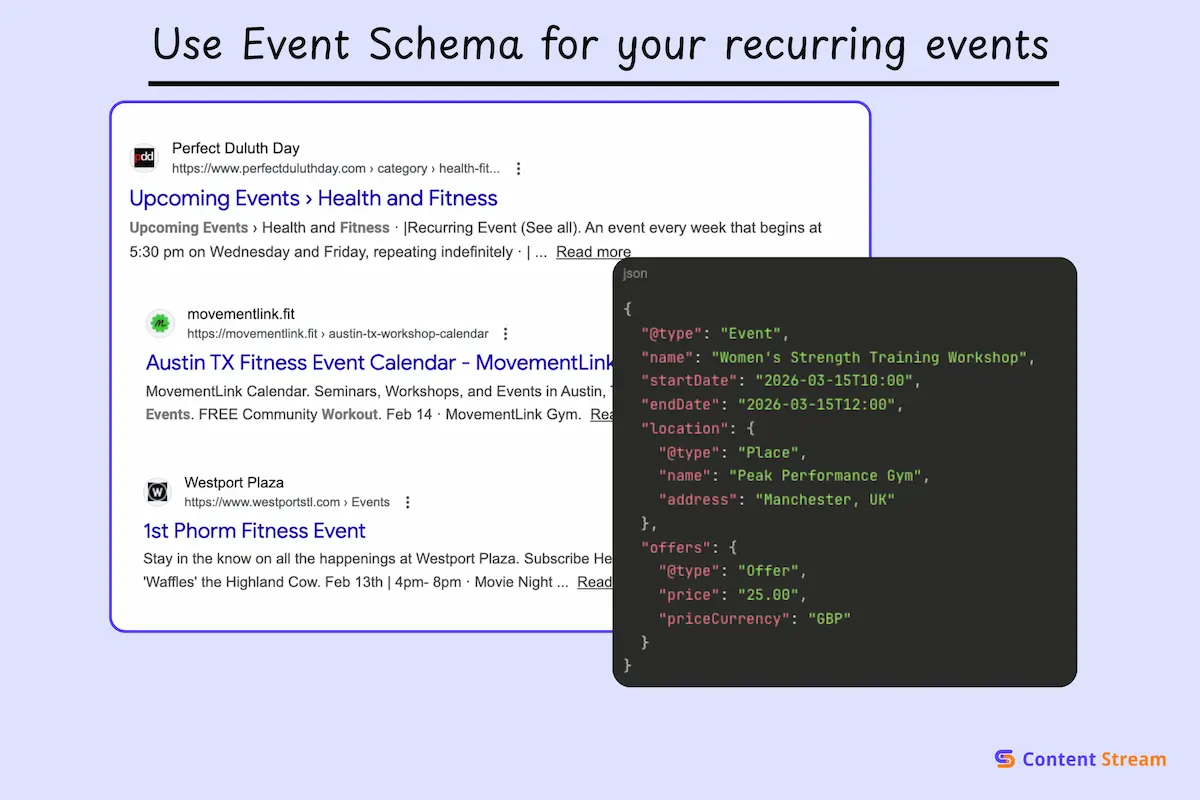
Event markup shares the details of your one-time or recurring events, the name, date, time, location, instructor, ticket price, and registration link. If you host workshops, special classes, boot camps, or scheduled group activities, Event Schema ensures that those occurrences get found by Google.
When properly implemented, your events can appear in Google’s event-rich results, complete with a calendar icon and direct booking options. This makes it easier for people to discover and sign up without having to dig through your site.
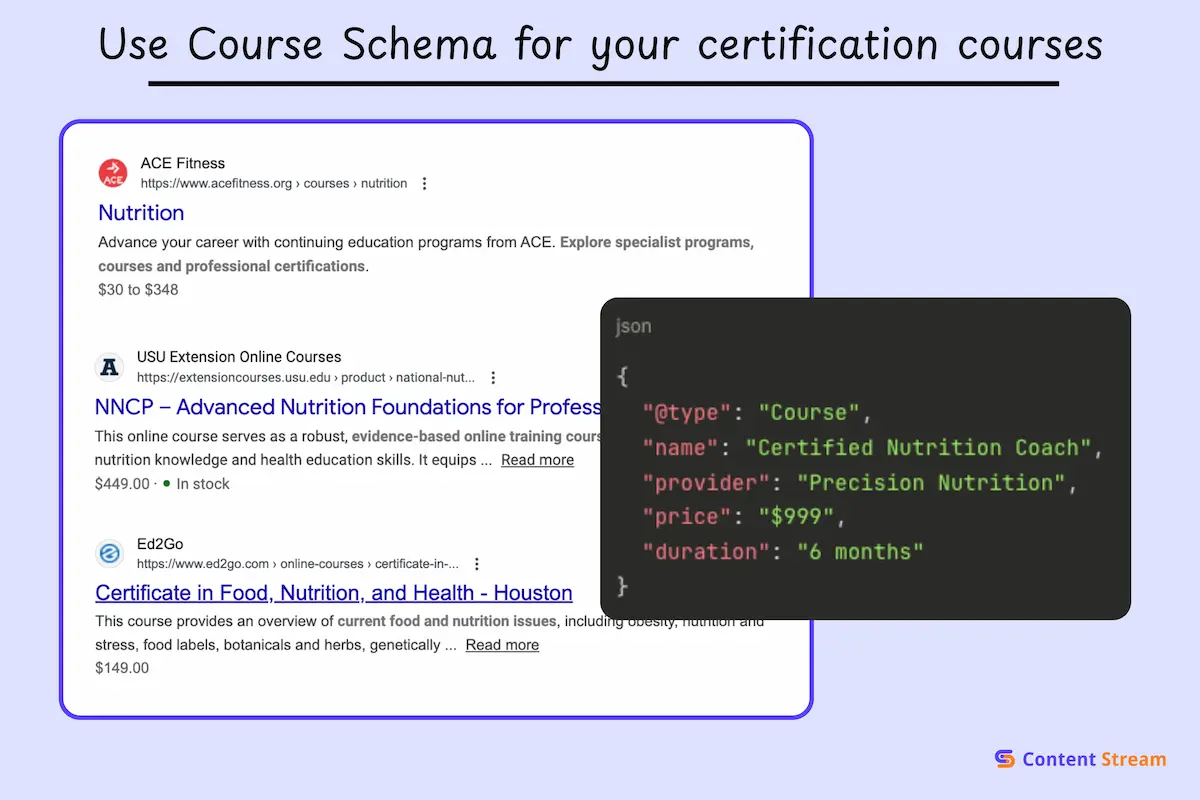
Course schema outlines educational or training content with a clear curriculum. It communicates to search engines what students will learn, how long the program runs, who’s teaching it, what the prerequisites are, and how much it costs.
This type of schema works best for fitness businesses offering structured training programs including but not limited to personal trainer certifications, nutrition coaching courses, online fitness academies, or multi-week transformation programs.
Course Schema tells Google all the relevant details about your program. Google can then surface your courses in dedicated education-focused search features where people are actively looking to upskill or learn new fitness methodologies.
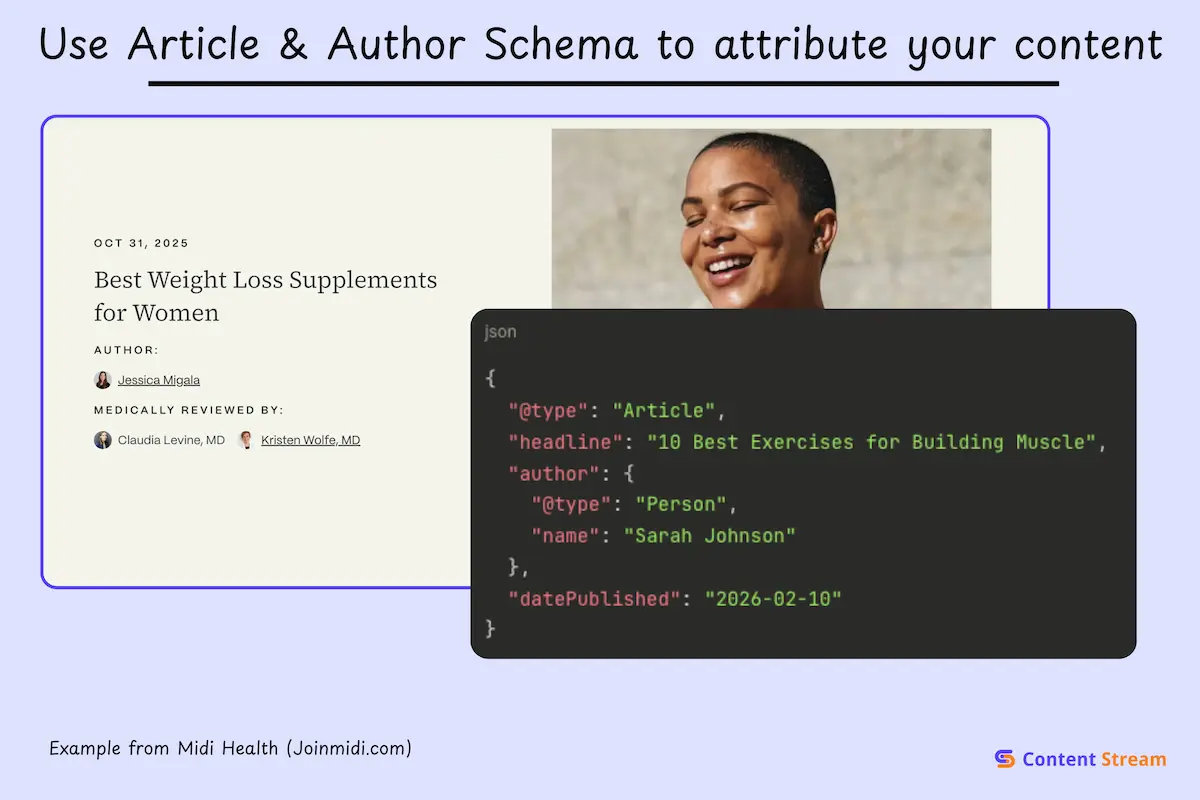
Article schema identifies your written content as a legitimate piece of journalism or educational material. This separates it from other kinds of content online, like news or whitepapers. The Author schema layers on top of Article schema, establishing who wrote it and their expertise.
Both schema types are valuable for your fitness business’ blogs, training guides, or other types of educational content.
Author Schema directly ties in to the E-E-A-T framework, which is critical for fitness businesses if they want to build authority and credibility.
Together, they help Google determine content quality and can get your articles featured in Top Stories, news carousels, or with author bylines displayed prominently in search results.
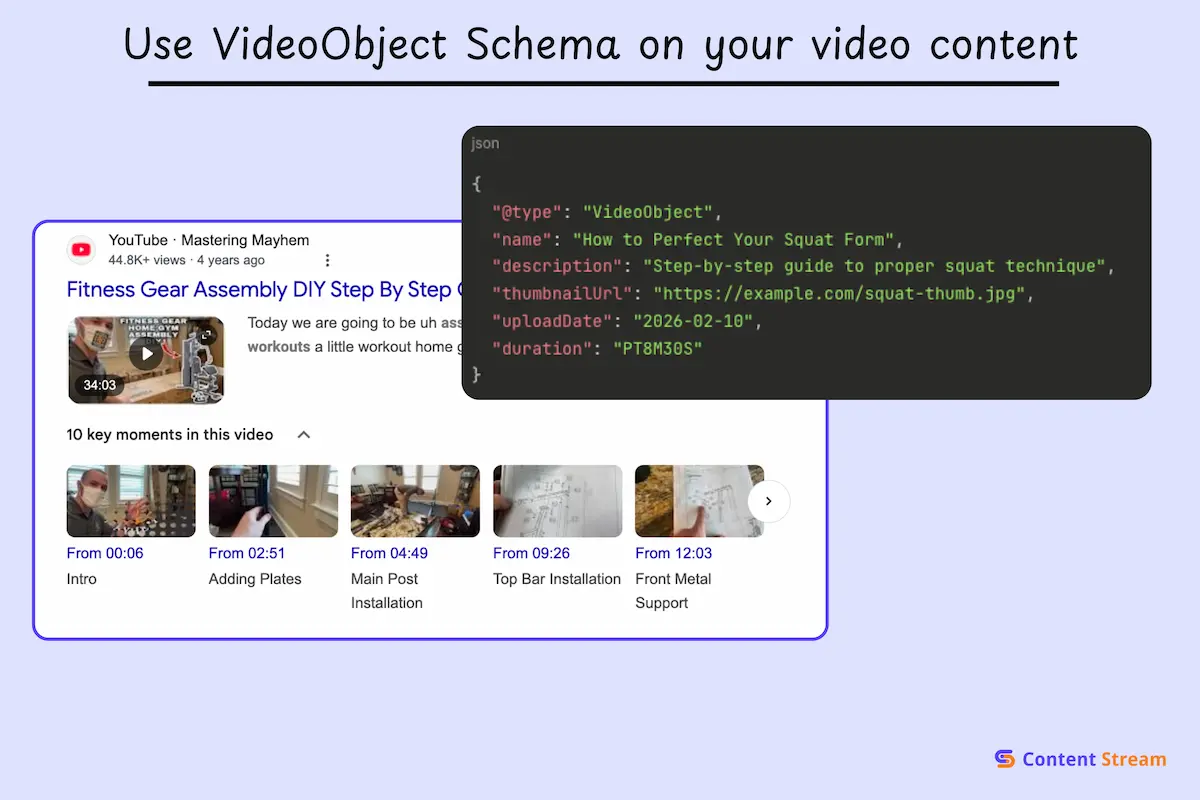
VideoObject schema markup tells Google about your video, sharing details like the title, description, thumbnail, duration, upload date, and hosting location.
If your fitness business creates video content (workout tutorials, form demonstrations, equipment breakdowns, etc), it can make it easier for more people to find your video.
Search engines use this to display video thumbnails directly in search results, complete with play buttons and timestamps, which dramatically increases visibility compared to standard text links. It also helps your videos appear in Google’s video tab and YouTube search if you’re cross-posting.
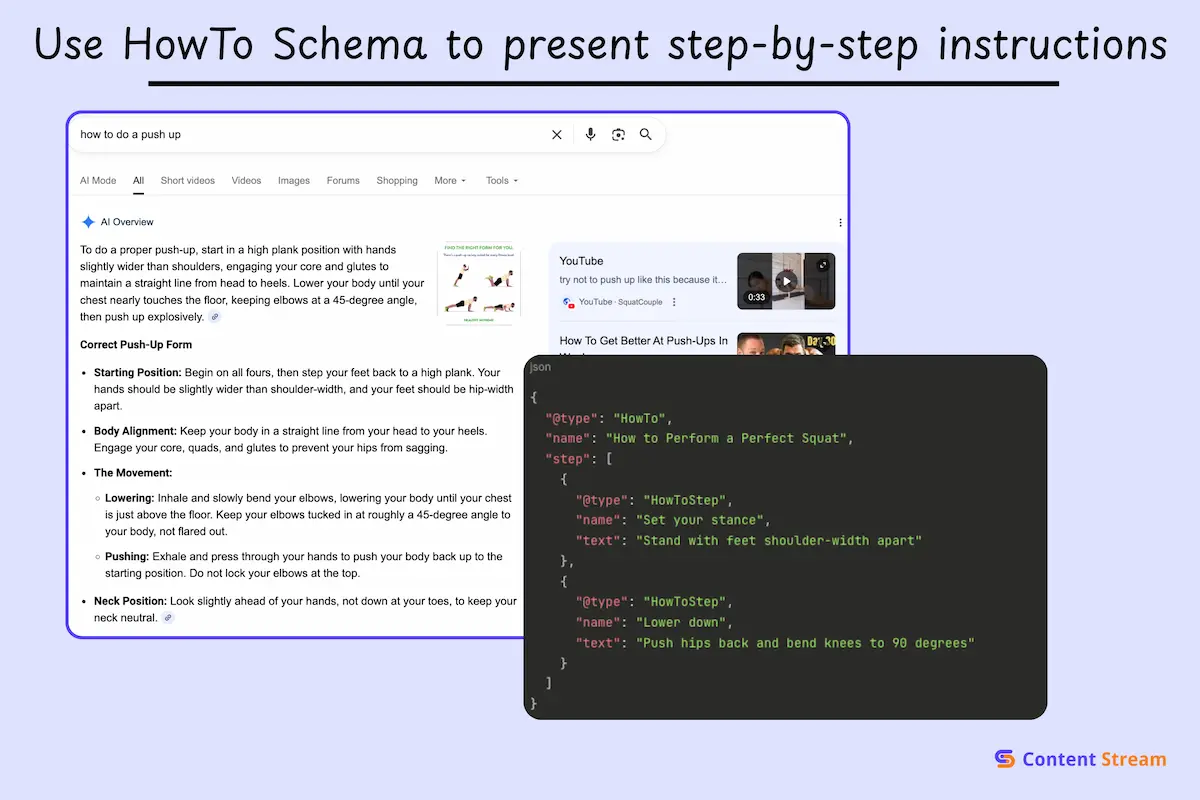
Google and LLMs usually parse How-to content without needing to apply Schema. So, you can probably skip this one without repercussions.
HowTo schema organizes your instructional content into clear, sequential steps that Google can break down and display to users as interactive guides.
If your fitness business uses content to teach a specific skill like exercise form breakdowns, equipment setup guides, etc, you want to use HowTo Schema.
When implemented correctly, your how-to content can appear with step-by-step formatting directly in search results, often with images or video clips for each stage. This makes your guidance more accessible and positions you as an authoritative source for that particular skill or technique.
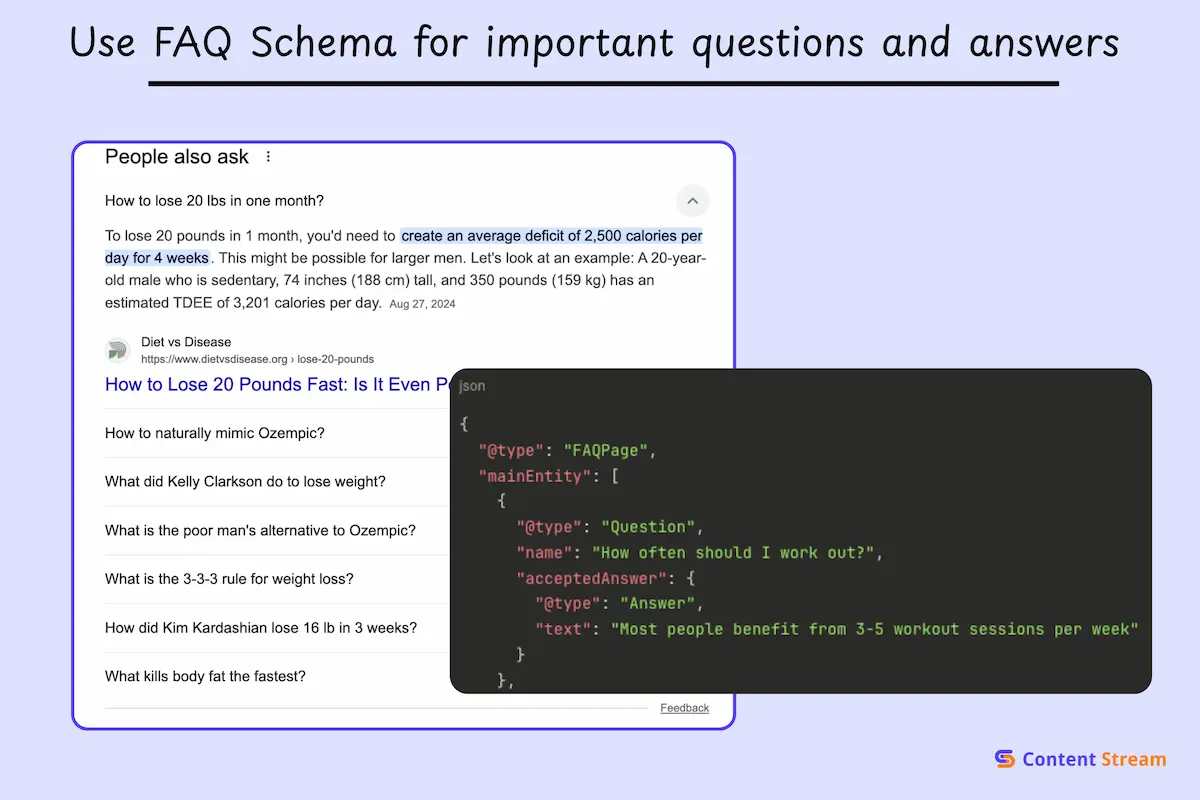
FAQ schema structures question-and-answer pairs so search engines can pull them into expandable dropdowns right on the search results page.
Your business needs it because it addresses common questions about memberships, class formats, cancellation policies, or training methodologies.
When someone searches a question your FAQ answers, Google may display your response directly without requiring a click-through. This immediately puts your page in a prime position because people can click through for a more robust answer, landing on your page.
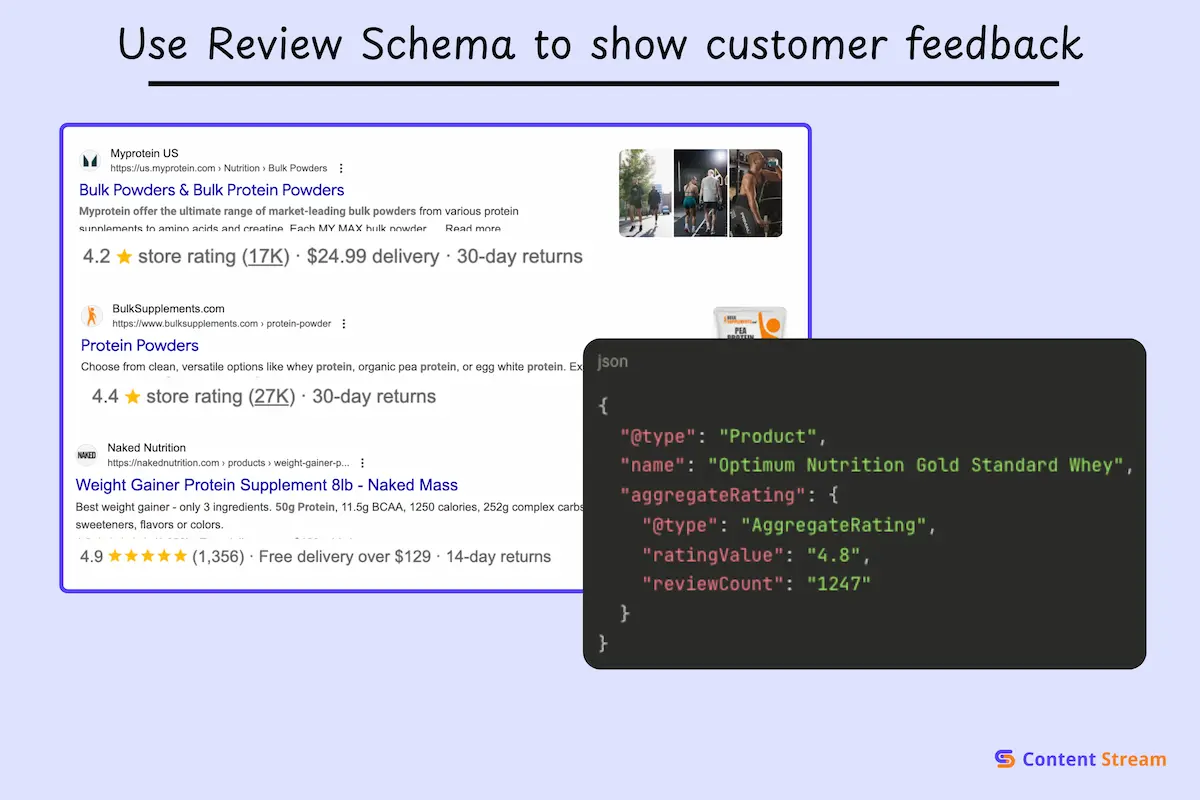
Review & Rating schema markup highlights customer feedback and aggregate ratings, allowing those star ratings to appear directly beneath your business listing in search. It’s important for fitness businesses that client testimonials and want to showcase social proof in search results.
When potential clients see 4.8 stars from 200+ reviews before even clicking, it builds instant credibility and significantly improves click-through rates. Google treats businesses with visible ratings as more trustworthy, which can influence local pack rankings.
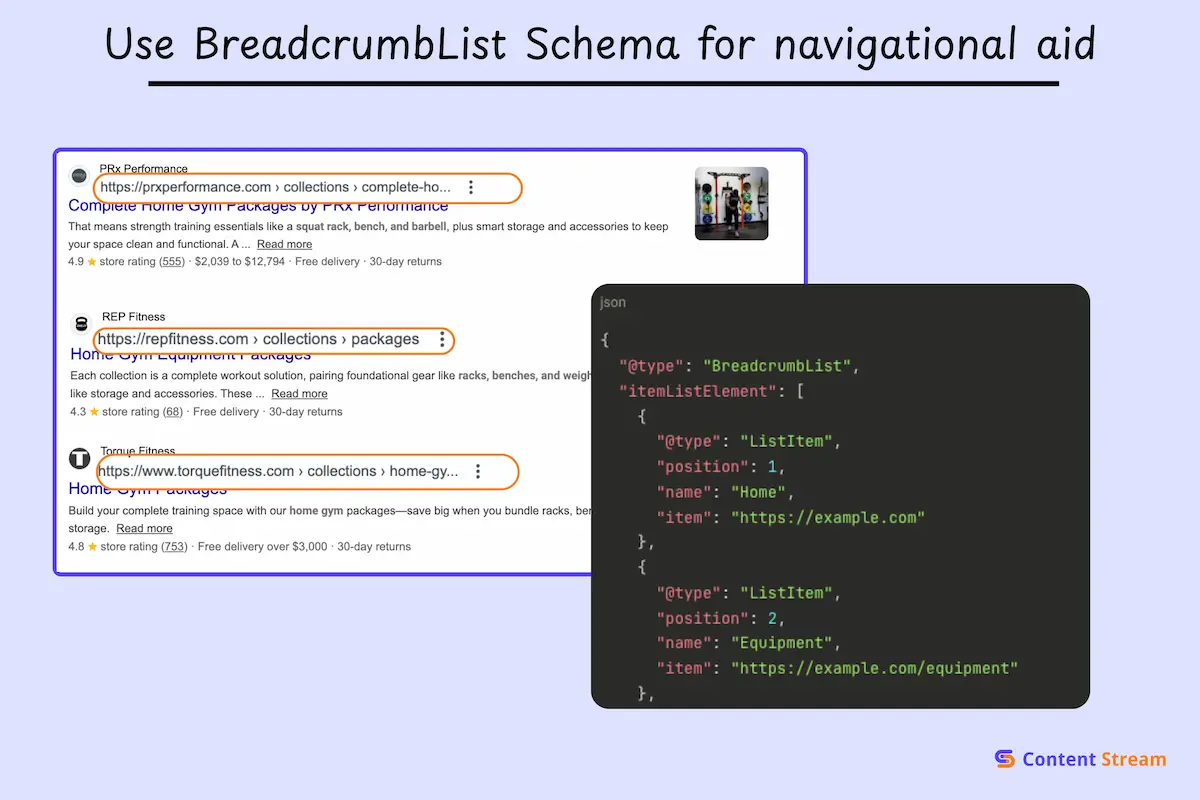
BreadcrumbList schema maps out the clickable trail showing how a user navigated to their current page. It may look something like Home > Services > Personal Training > Strength Coaching.
The BreadcrumbList schema matters for fitness websites with multiple service pages, location pages, or content hierarchies that need clear navigation paths for both users and search engines.
Google displays these breadcrumbs in search results as a navigation aid, replacing the plain URL with a more intuitive path that shows site structure at a glance. It helps users understand context before clicking and signals to search engines how your content is organized.
The easiest way to add schema markup to your website is with plugins liek RankMath and Yoast. Even the free tiers automatically add markup like Article & Author Schema. You can also use elements within your website builder Elementor or WordPress to add other schema types, like FAQ schema and HowTo Schema.
But, if these aren’t available or you want to have greater control, here are the other options.
In 2026, JSON-LD (JavaScript Object Notation for Linked Data) is the most widely recognized standard for implementing schema markup.
Google explicitly recommends JSON-LD standard over older formats like Microdata or RDFa.
The reason is simple: JSON-LD sits in a separate <script> tag in your page’s <head> section, completely independent of your HTML content. This means you can add, edit, or remove structured data without touching your site’s visible elements or risking layout breaks.
Here’s how you implement it:
Many website builders and CMS platforms offer drag-and-drop schema widgets that require zero coding. Platforms like Wix, Squarespace, and Shopify have built-in schema options and they generate the JSON-LD code automatically in the background.
These widgets are ideal if you’re managing your own site without a developer and want a visual interface.
The downside is you’re limited to whatever schema types the widget supports, and customization can be restricted.
If you have access to your website’s theme files or header/footer code injection areas, you can manually add JSON-LD snippets directly. This gives you complete control over every property and allows you to implement any schema type without relying on third-party tools.
Here’s how you can do that:
After adding your schema, use the Google Rich Results Test to check if your markup qualifies for rich snippets. Just paste your URL or code snippet, and Google will show you what rich results are eligible and flag any errors or warnings.
For more comprehensive validation, use the Schema Markup Validator, which checks your code against schema.org standards. It catches issues like missing required properties, incorrect data types, or malformed JSON syntax.
Schema markup ensures that your website is understood by Google and eligible for rich results. It won’t immediately boost your organic performance, but not having it can hurt your content and visibility.
But Schema is only one part of fitness SEO; there’s also technical website optimization, and ensuring that your content meets Google’s YMYL standards for health and fitness businesses.
We recommend you start with a free SEO audit of your website to see what’s working, what’s not, and all the simple improvements you can make to improve your site’s SEO.

I’m Matthew, a personal trainer turned SEO who’s worked with brands like Gymfluencers, Sailo, ClickCease, and Fraud Blocker. These days, I help small to medium sized companies grow their reach with smart, search-focused content.
