How to Structure Your Health & Wellness Ecommerce Site for SEO: A Platform-by-Platform Guide
SEO is changing rapidly, but it’s more important than ever if you want your e-commerce store to be discovered organically. Your site’s setup—technical foundations, URL structure, and overall architecture—all influence how Google understands and ranks your site.
In this guide, we cover the structural foundations that affect your health and wellness store’s organic visibility. We share initial setup, important considerations, and implementation tips for Shopify, WooCommerce, Wix, and SquarespaceCommerce.
Google has dozens of ranking factors for e-commerce stores. The most important ones (that you can actively control) can be grouped into five categories. If you’re building from scratch or optimising as you go, these are the ones to focus on.
Technical SEO determines whether Google can access, crawl, and index your store. It needs to be dialled in for you to even begin to show up in search results.
For most non-technical store owners, there are four areas you can manage with ease:
Google uses page speed as a ranking signal, and slow pages lose customers before they convert. In e-commerce, product pages with heavy images are usually the bottleneck. Most platforms handle hosting pretty well, but the add-ons you choose—themes, apps, and image sizes—can slow things down.
Google has said that it indexes the mobile version of your site first, so we recommend a focus on this. The platforms covered in this guide produce mobile-responsive stores by default, but you can use PageSpeed Insights to see how your site does on mobile.
When the same product appears under multiple URLs (like product variants, different flavours, equipment colours, etc.), canonical tags tell Google which version should be indexed. Without them, you risk duplicate pages. We’ll cover how each platform handles canonical tags in the next section.
Your sitemap lists every important page on your store, giving Google’s crawler an easy way to find all pages. All four platforms covered here can generate sitemaps automatically. The main task on your end is submitting it to Google Search Console once your store is live.
We have a more detailed guide on technical SEO for health and fitness businesses. It covers crawlability, Core Web Vitals, and indexation in more depth.
Site architecture is how your pages are organised and how Google moves between them. The fewer clicks it takes to reach a page from your homepage, the greater the index coverage, and the more SEO value that page receives.
Your most important pages should be reachable within three clicks from your homepage. For a health and wellness e-commerce platform, those’ll be your product pages, blog section, and important research breakdown.
We call this a “flat structure”, and here’s what that might look like for your site:
Homepage → Sleep Support Supplements → Magnesium Glycinate 500mg
That’s three levels. A deeper structure buries your product pages, making it harder for them to get crawl priority.
Here’s what a deeper structure might look like:
Homepage → Supplements → Sleep → Magnesium → Capsules → Magnesium Glycinate 500mg
Category naming is also a very important part of site structure. Your categories should be named around health goals and how users search, not around how you stock products.
Consider categories like the following:
      Capsules
Powders
Bundles
These make sense for your stocking, but don’t match how people search. These will still get indexed, but there’s a better way.
The below example will be more discoverable because these are the supplement categories users are searching for.
      Sleep Support
Gut Health
Immune Support
Your product URLs tell Google what a page is about before the crawler has even read the content.
You want the last part of the URL, the slug, to describe what your page is about. Here’s what that might look like in practice:
Weak: [yourstore.com/products/SKU-234534-B]
Strong: [yourstore.com/products/magnesium-glycinate-sleep-support]
The second version includes the keyword, is readable to a human, and gives Google useful context. The first tells it nothing.
Structured data helps search engines understand what your content means, beyond the page users see. The biggest benefit of adding structured data is rich results in the SERPS. Here’s a page without rich results and one with.
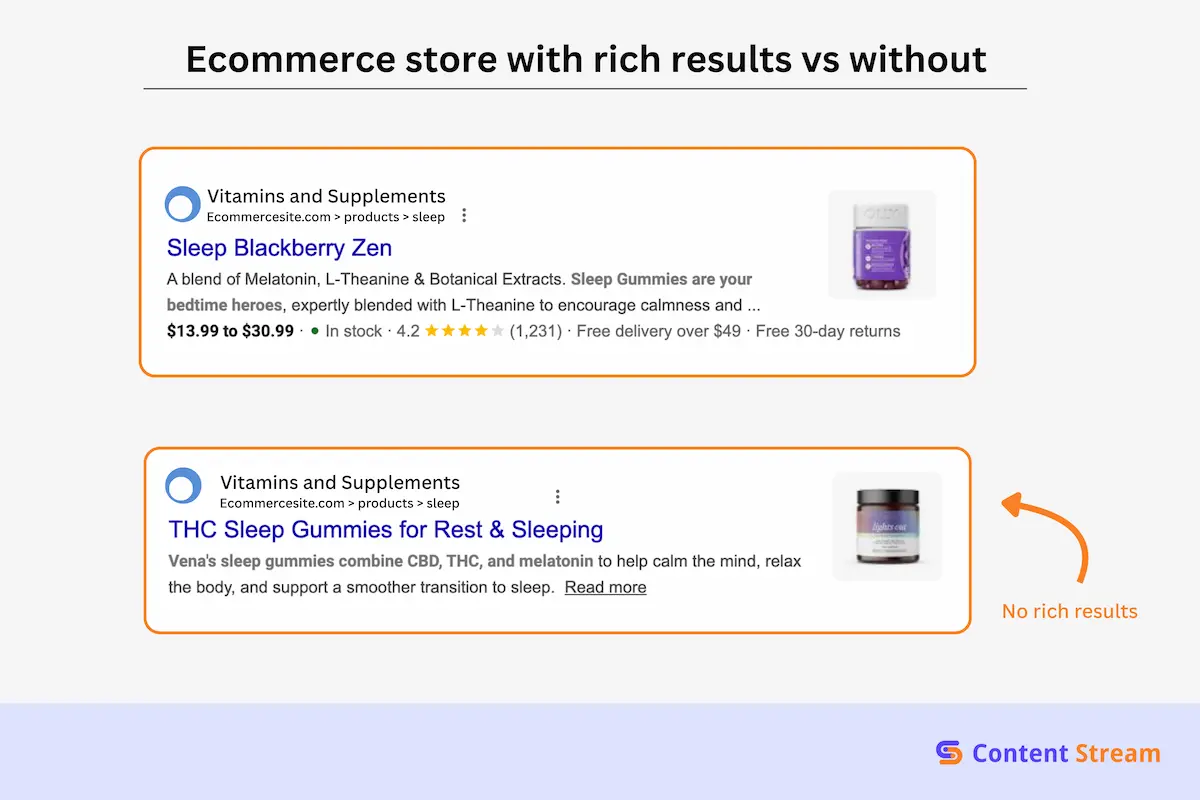
See how the rich results show the price, rating, stock, and availability. This data is pulled directly from your structured data and will signal credibility to the searcher.
There are four schema types that matter most for health and wellness e-commerce stores:
Read more: Understanding structured data for health and wellness businesses.
None of these require you to write code manually. Each platform either handles some of them automatically or has a plugin or app that does it for you. More in the next section.
Your product pages are the money pages, and they are where we put a great deal of our SEO focus. Two things to focus on here: content originality and trust signals.
For originality, you want to create unique product descriptions instead of copying manufacturer info. Copy/pasting generic descriptions creates duplicate content across every store selling the same product. That gives Google no reason to rank your version.
The second focus point is trust signalling. Health and wellness is YMYL territory. That means you need to display relevant third-party certifications, ingredient transparency, clinical references, and verified customer reviews. These all function as trust signals for users and especially for Google.
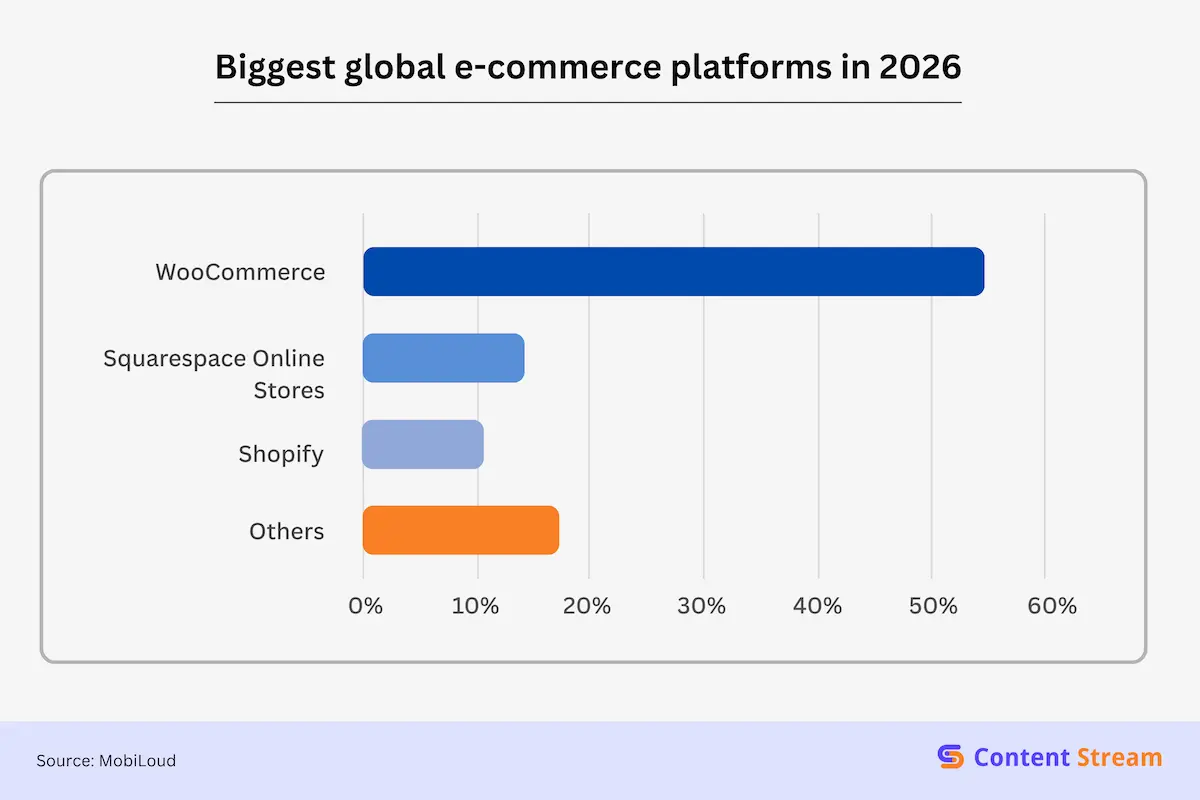
Shopify, Wix, Squarespace, and WooCommerce are the biggest e-commerce platforms by market share globally. Here’s a graph of how they compare.
| E-commerce Platform | Global Market Share |
|---|---|
| WooCommerce and Woo Themes | 53.80% |
| Squarespace Online Stores | 13.96% |
| Shopify | 10.56% |
| WixStores | 4.28% |
| Others | 17.40% |
Next, we share platform-specific guidance for each of them.
Shopify is the e-commerce platform of choice for large, established brands. It also represents 28.8% of the top 1 million e-commerce websites globally. The platform handles a lot of the technical requirements, including your canonical tags, XML sitemaps, mobile responsiveness, and HTTPS.
But there are still structural and SEO decisions you need to make for yourself. This section covers what those are and how you can handle easy implementation.
Shopify organises your store around collections and products. By default, these are named around the product format—capsules, powders, bundles—rather than health goals. Rename collections around buyer intent before you launch, so every new product added rests on that solid foundation.
Shopify also supports up to two levels of collections natively. For most wellness stores, that’s all you need.
Here’s how you can assign those while keeping a flat architecture: Have a top-level supplements collection with sub-collections for different categories like Sleep Support, Gut Health, and Immune Support for example.
Shopify’s folder conventions are fixed [/products/, /collections/, /blogs/] and you cannot change them without custom development. But that may not be necessary. Simply adjust the slug as needed. Keep it clean and mapped close to the product name.
Products listed on Shopify are accessible via two URLs:
The product URL:
domain.com/products/dumbell-rack
And the collection’s URL:
domain.com/collections/collection-name/products/dumbell-rack
Collections URLs are automatically canonicalised back to the main product URL. But it’s worth checking in Google Search Console after launch to confirm it’s working correctly for your store.
Shopify automatically generates Product schema covering name, price, and availability. But it doesn’t automatically create Review schema. For this, you can use review apps like Judge.me and Okendo. You need to install the widgets and have at least one review for it to be active.
Shopify’s default meta title format looks something like:
Magnesium Glycinate — Store Name
But that’s very generic, and we see this default applied very often across many e-commerce sites we audit.
We always recommend rewriting product meta titles around specific search queries. An example:
Magnesium Glycinate 500mg for Sleep — Store Name
This is a small change, but you’re adding search intent and keywords, which can give you an edge in the SERPs.
WooCommerce is built on WordPress and gives you more control over your store’s SEO than any other platform on this list. You can customise URL structures, category hierarchies, and technical SEO settings with a lot more freedom.
The trade-off is that more control means more decisions need to be made with the right framing.
WooCommerce uses product categories and subcategories to organise your store and doesn’t impose a fixed hierarchy. You can build as many levels of categories as your range requires, even though two is sufficient for most businesses: a top-level category for general grouping and subcategories for individual supplements or more specific groupings.
Be sure to keep your architecture flat.
WordPress permalink settings default to a format that’s not SEO-friendly. The standard setting will produce URLs like:
yourstore.com/?p=123
instead of
yourstore.com/product/magnesium-glycinate-sleep-support
Change this in Settings → Permalinks in WordPress so your slugs follow the post name structure.
WooCommerce generates basic Product schema (name, price, and availability) natively.
Use plugins like Yoast SEO and Rank Math for Breadcrumb schema, and Organisation schema. These are very easy to set up, and you can find instructions online.
For Review schema, WooCommerce’s built-in review system outputs AggregateRating markup when reviews are enabled, but only if a product has at least one published review. Your theme will also need to render the review widget on the product page.
One note when working with WooCommerce: it creates multiple URLs for the same product when variations like different colours or sizes exist. Without a plugin handling canonicalisation, this will create duplicate content across variant URLs.
WooCommerce is excellent at handling your technical SEO, but two points we like to address early on are crawl budget and caching.
Stores with large product ranges, multiple category levels, and active blogs will create many URLs. You’ll find that product pages, variation pages, category archives, and paginated pages can multiply quickly. It’s worth disabling indexing for tag pages and paginated archives in your SEO plugin settings so Google’s crawl focuses on the pages that matter.
WordPress doesn’t cache pages by default, which means every page load hits your server fresh. This can create speed problems if your WooCommerce store has significant traffic. Use plugins like WP Rocket or W3 Total Cache to resolve this simply without developer input.
Standard best practices apply here. Make sure your product description covers ingredients, certifications, use cases, etc., and is unique content.
Squarespace is a popular choice for smaller wellness brands, particularly where visual design is a priority. It handles the technical basics automatically, too, from sitemaps to mobile responsiveness and canonical tags.
Squarespace organises products into categories, which function similarly to collections on Shopify.
One shortcoming is bulk category management: renaming or restructuring categories across a large catalogue has to be done manually. If you have a team to handle this, no problem. Otherwise, it’s critical to get your category structure right before adding products to avoid the tedium of restructuring later.
Squarespace generates URLs automatically based on page and product titles, and you can easily edit the slug at the point of creation. However, if you want to change a slug after indexing, you’ll need to set up a manual redirect.
There’s no way to customise the folder structure itself (the part before your slug), and Squarespace decides this based on how your site is organised.
/products/ or /category/
So, decide your URL conventions before launch, since correcting them after indexing is more manual work here than on other platforms.
Squarespace generates basic structured data automatically for products and the organisation, but coverage is limited, particularly for Review schema. The platform does not output Aggregate Rating markup, and your ratings won’t show up in search results.
You can use third-party integrations like Yotpo and Stamped, although that involves some manual setup.
Squarespace lets you edit all the important content in your product pages. However, it does not support the structured tabs (Ingredients, Certifications, Nutrition Facts). An easy fix is to write these into the main product description itself instead of separating them into sections.
Wix is beginner-friendly with lots of SEO and e-commerce tools to support a growing health and wellness store. It’s especially great for straightforward product ranges.
Wix organises stores around collections and subcollections. Collection naming is fully editable, so use a health-goal-led structure by naming your collections after the results customers seek. For example,
sleep-support/ and /gut-health/
Slugs are editable through Wix’s SEO settings panel, and the platform applies changes without requiring manual redirect setup. The folder structure is also fixed. Products sit at:
/product-page/product-slug/ and collections at /shop/collection-slug/.
Every page on Wix is assigned a canonical URL by default, which helps prevent duplicate content issues across variant or filtered pages. Wix also allows manual editing of canonical tags in SEO settings.
As always, focus on the slug and make sure they match the products.
Wix generates product schema automatically, and its native review system outputs AggregateRating markup when at least one published review exists on the product page. For broader schema types, you can embed blocks where JSON-LD can be added, but that means someone on your team will need to generate it first.
Wix handles most of the technical concerns your store will have, especially when it’s in the early days.
Wix’s SEO panel shows all key fields, including meta title, meta description, and alt text, in one place without a separate plugin. On the flip side, there are no native structured product tabs. You can use Wix’s accordion elements to organise ingredients, certifications, and usage information within the product description instead.
Site structure isn’t the most visible part of running a health and wellness e-commerce store. But it is an important foundation and can set you up for success. Addressing everything from the get-go (like we laid out in this guide) will also make your site much easier to manage down the line. And that’s regardless of the platform you choose.
You don’t need a developer to implement most of this, as every platform covered here has native tools for easy setup.
If you’re unsure where your store currently stands, a technical audit is the fastest way to find out. We work with health and wellness e-commerce brands to identify exactly what’s holding back their organic visibility and build the foundations to fix it.

I’m Matthew, a personal trainer turned SEO who’s worked with brands like Gymfluencers, Sailo, ClickCease, and Fraud Blocker. These days, I help small to medium sized companies grow their reach with smart, search-focused content.
