SEO for Fitness E-commerce Websites: The Complete Guide
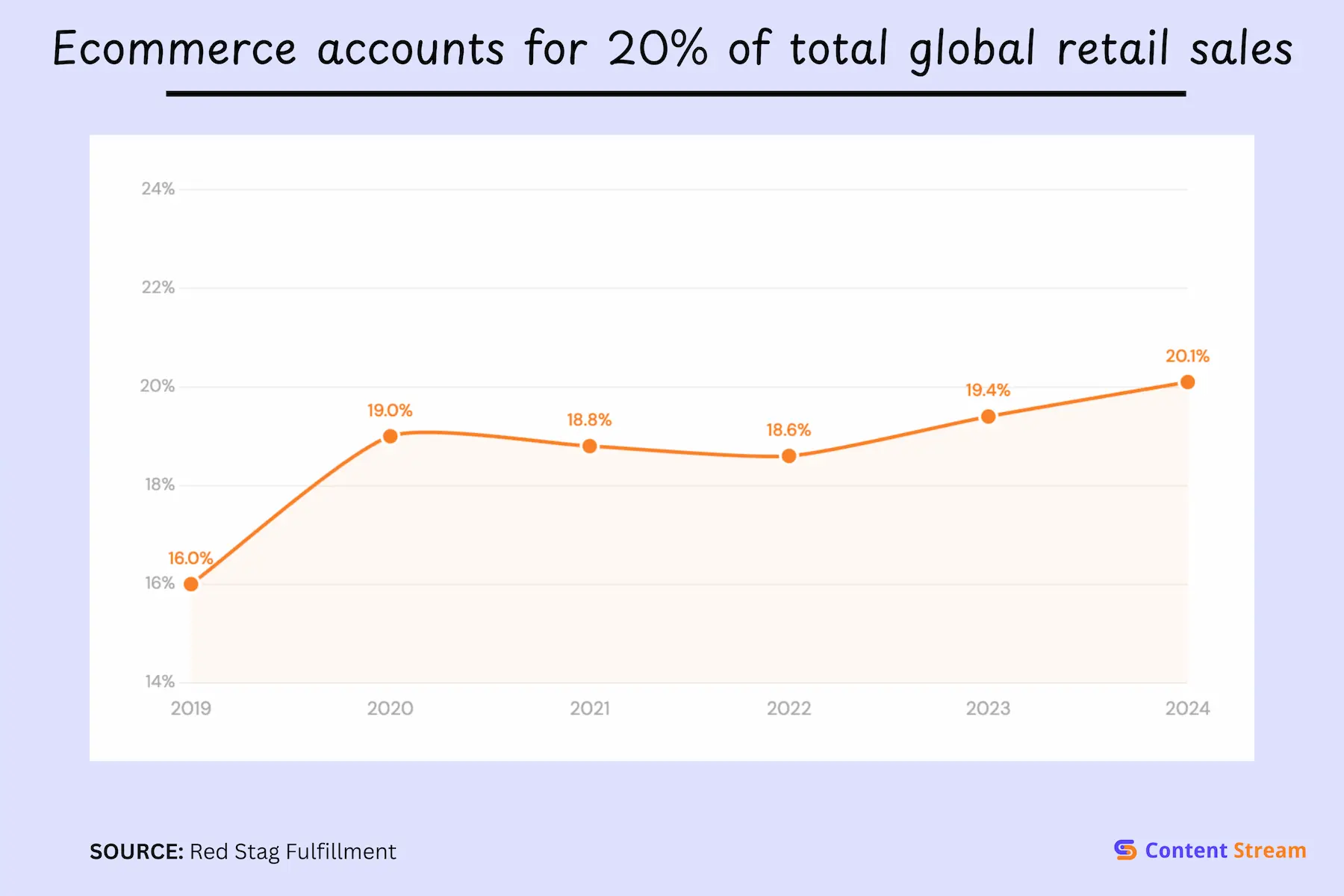
Fitness e-commerce now accounts for 20% of global retail sales. But with that growth has come fierce competition. To win as a smaller brand, you need to not only adhere to SEO best practices for e-commerce (which we share in this blog) but also niche down to start. I recommend targeting long tail keywords you have a chance of dominating and then growing to higher competition ones as your site’s authority increases.
E-commerce has steadily grown YoY for the past 5 years. And a huge part of that growth are health, fitness, and lifestyle brands: supplements, equipment, apparel, digital training programs, and more.
Most brands’ model involves leaning hard on paid ads to drive sales. The problem with this is that the sales stop when spending stops.
But SEO builds something different for you. It creates sustainable organic traffic that keeps flowing regardless of your ad spend. When someone researches supplements or equipment, you want your products to show up.
In this guide, we’ve adapted Google’s official e-commerce SEO recommendations for your fitness retail business. If you run your fitness business through a Shopify store, we have created an SEO guide specifically for Shopify businesses.
We cover technical foundations, product data, structured markup, and content strategy.
Yes, e-commerce brands in the health, fitness ,and lifestyle space need specialized SEO approaches. That’s because the competition is stiff, large brands dominate many search terms, and, the messy middle makes it hard to pin down any individual user intent. As an example of this, people searching for “what is creatine” are likely very different from ready-to-buy searchers looking up “creatine monohydrate 5lb.”
When optimized correctly, combined with good SEO practices and site topical authority, your products can appear across several segments of Google’s results page, not just the traditional search results.
This means your business potentially has more ways to surface products and show shoppers what you offer.
Here are all the places your products can be featured:
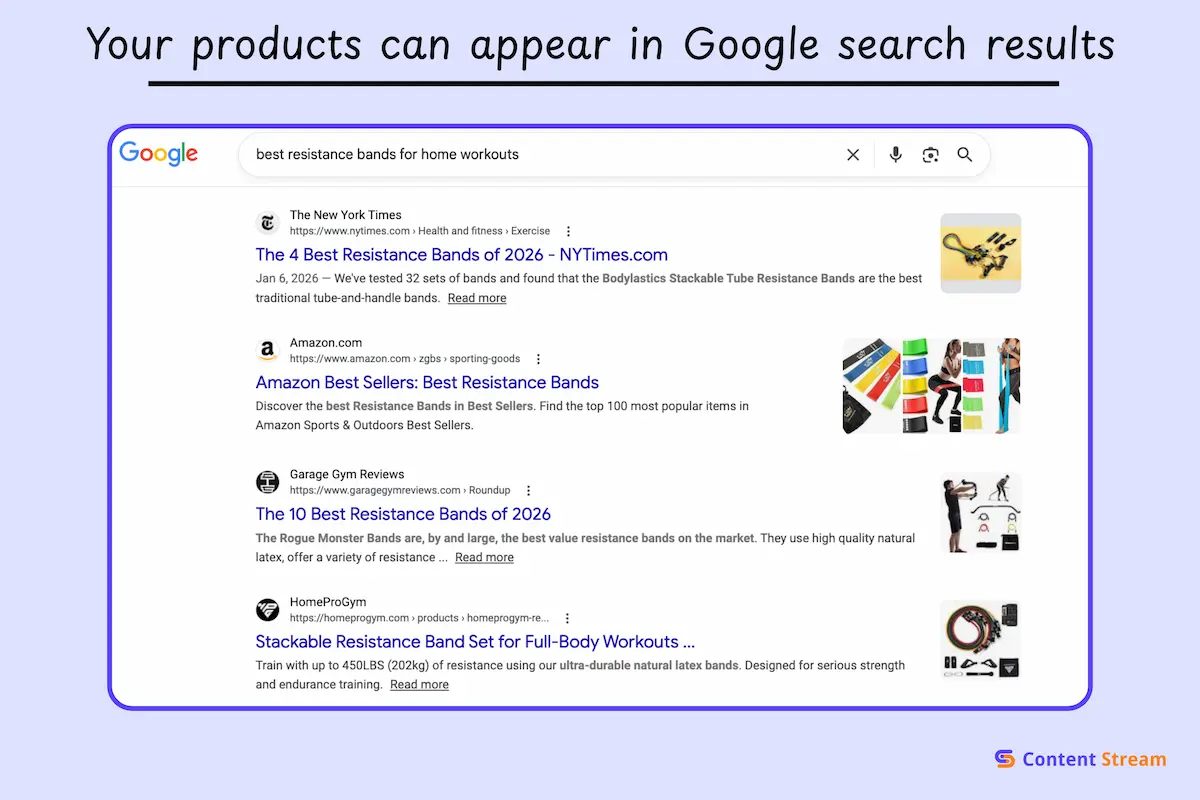
This is where users go when they’re ready to buy. They feature knowledge panels that offer a lot of information upfront.
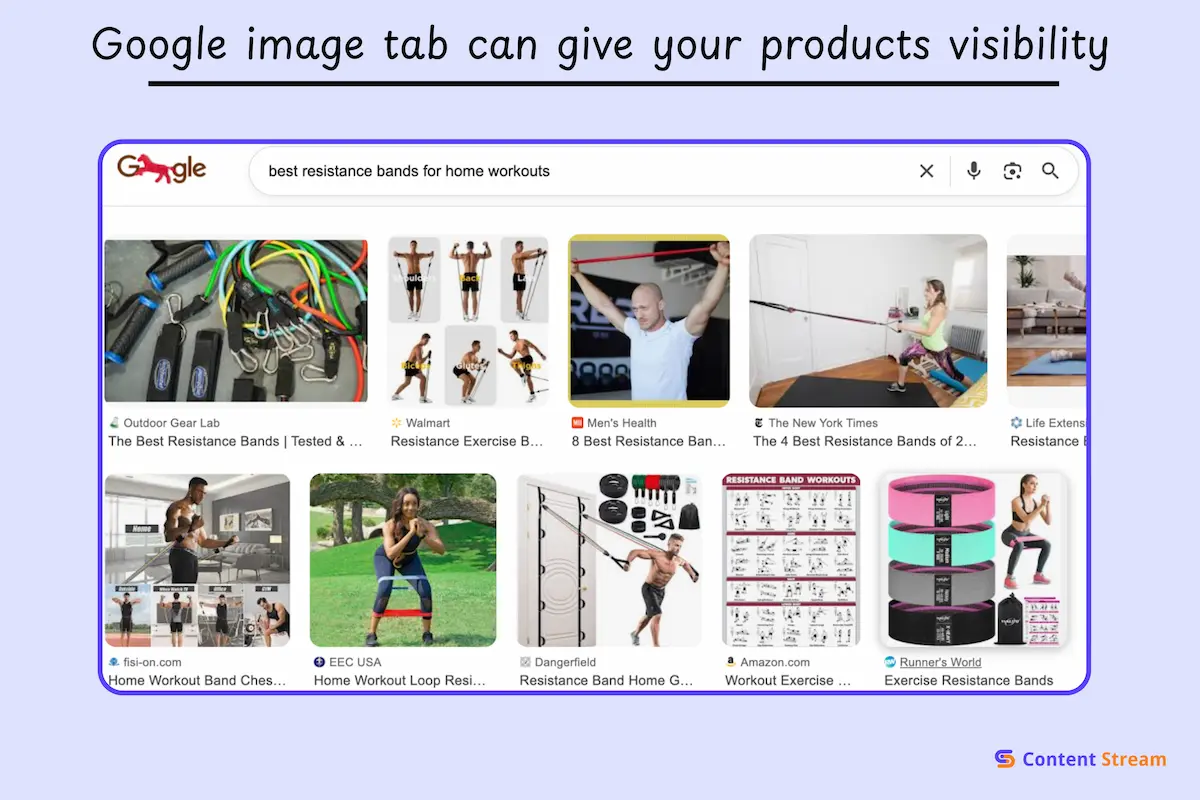
56% of shoppers use visual search for product discovery, and that makes this page very valuable.
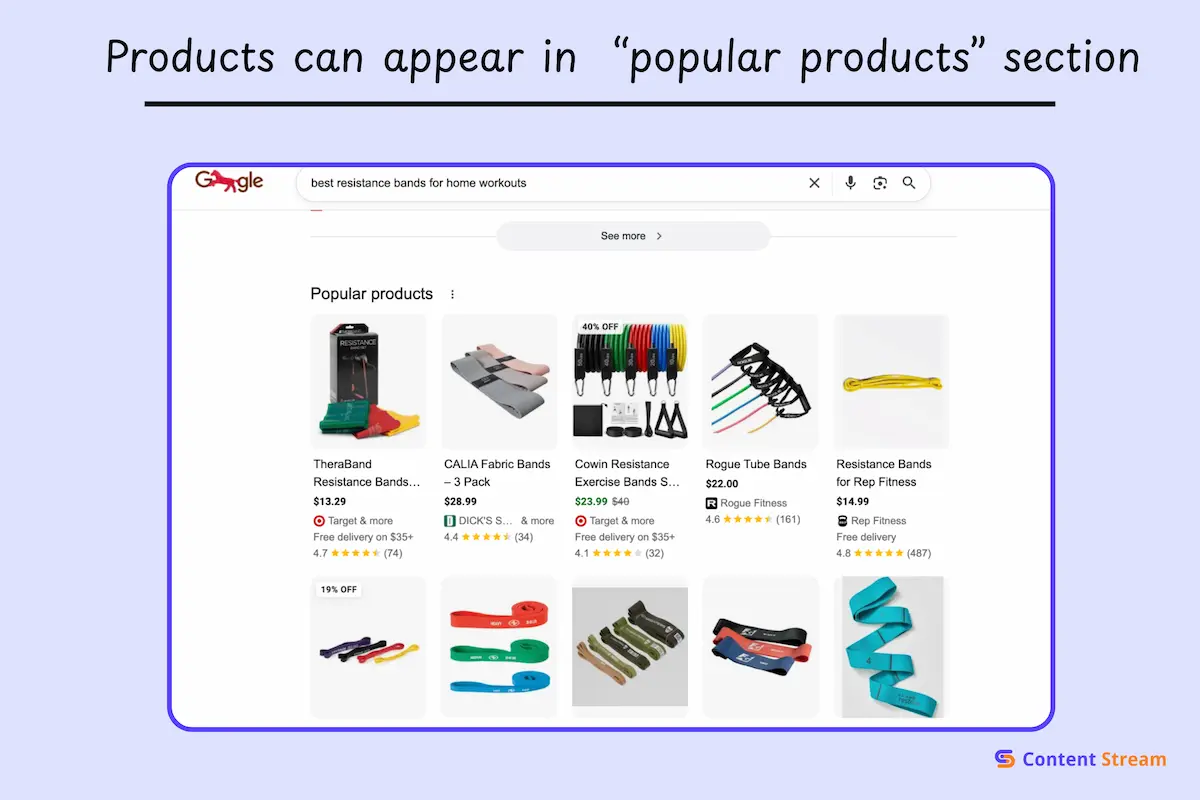
These are usually at the bottom of the SERP and showcase trending or highly rated items in carousel formats.
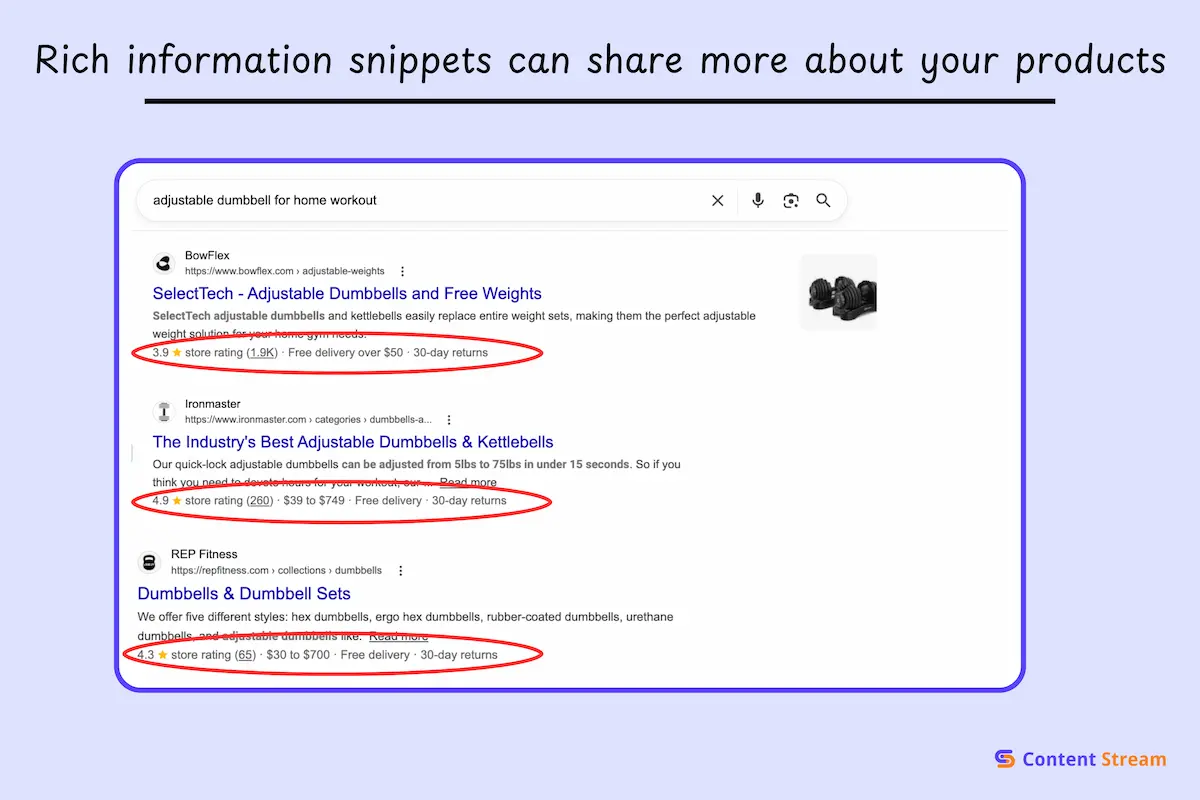
Enhanced organic results display rich information directly in search. Price, availability, star ratings, and review counts appear right in the listing, making your result stand out and increasing click-through rates.
Google needs to understand what you’re selling in detail. That means what each product is, how much it costs, whether it’s in stock, and other key details.
There are two main methods for sharing this data with Google:
Both used to be distinct, but the lines have blurred more recently. Ideally, you need to do both to give your products the best chance of visibility.
Structured data is code you add directly to your product pages that tells Google exactly what information means. There are different kinds of schema for health and lifestyle businesses, but for this purpose, you’ll be using the Product & Offer Schema.
The main advantage is direct control. You add the code to your pages, and Google uses this structured data to generate product snippets in search results.
If you use Shopify, WooCommerce or BigCOmmerce, the platform will automate this for you. WIth shopify, JSON-LD is automatically injected into every page. WooCommerce, on the other hand, let’s you add plugins like YoastSEO or Rank Math to handle this.
With Merchant Center feeds, you upload your product data to Google Merchant Center, basically telling Google what your products are and the information to display.
It used to be a tedious process, but now, you can simply install the official Google & YouTube app on Shopify, or Google Shopping plugin if you use WooCommerce. Then every time you change a price, add items or sell out previously listed products, the information is synced with Google Merchant Center feeds automatically.
Structured data uses a standardized format called schema markup to label information on your pages. Google recommends specific schema types for e-commerce sites in their structured data documentation.
As an e-commerce store, you need the following core schemas:
Let’s break down how you can implement these for your fitness products.
Product schema is for individual items you sell. A single tub of whey protein, one pair of resistance bands, a specific yoga mat. This is your foundational markup.
Every Product schema you create needs these required properties:
ProductGroup schema handles variants. When you sell the same product in different sizes, colors, or resistance levels, ProductGroup tells Google these are variations of one item, not separate products.
This matters for your fitness products because variants are everywhere. Without ProductGroup markup, Google might see “Whey Protein Chocolate” and “Whey Protein Vanilla” as completely different products when they’re actually variants of the same item.
Merchant listings are for pages where people can directly purchase products. These will be your actual product pages on your e-commerce store. Product snippets, on the other hand, are for informational or review pages where you’re discussing products but not selling them directly.
If you’re a supplement brand with an e-commerce store, your product pages get merchant listing markup. If you also publish blog content that reviews products, those comparison pages get product snippet markup.
Beyond Product and ProductGroup, several other schemas significantly impact how your fitness products appear in search.
Product identifiers are unique codes that tell Google exactly which product you’re selling. They matter because Google uses them to match your products with data from other sources, verify authenticity, and determine when to show your listings.
The most important identifier is the GTIN.
GTIN stands for Global Trade Item Number. It’s a globally unique identifier assigned to products by manufacturers. You’ve seen them as barcodes on product packaging.
The most common GTIN formats are:
When you buy protein powder from a major brand like Optimum Nutrition or Dymatik, that product has a GTIN assigned by the manufacturer. The same GTIN identifies that exact product regardless of who sells it.
Google requires GTINs because they provide certainty. According to Google’s product data specification, GTINs help Google “show your products to the right customers” and improve data quality across Shopping surfaces.
When multiple sellers list the same supplement with the same GTIN, Google knows they are identical products and can aggregate reviews, compare prices, and present comprehensive information to shoppers.
Without GTINs, Google can’t verify whether your “Optimum Nutrition Gold Standard Whey 5lb Chocolate” is the same as another seller’s listing.
| Product Type | GTIN Required? | Examples |
|---|---|---|
| Branded supplements | Required | Optimum Nutrition, Dymatize |
| Name-brand equipment | Required | Concept2, Bowflex, TRX |
| Popular apparel brands | Required | Nike, Adidas, Lululemon |
| Private label products | Not required | Your own branded supplements |
| Custom blended supplements | Not required | House-blend formulas |
| Handmade accessories | Not required | Custom resistance bands |
| Digital products & books | Not required | Training programmes, eBooks |
Google requires GTINs for any product that has one assigned by the manufacturer. If you’re reselling branded fitness products like supplements, equipment from major manufacturers, or name-brand apparel, you should include the GTIN.
To recap:
For products without GTINs, Google requires you to explicitly indicate this in your product feed or structured data. Don’t just leave the field empty. Mark it as not applicable.
The penalty for omitting required GTINs is severe. Google may reject your products from Shopping surfaces entirely or significantly limit their visibility.
When GTINs aren’t available or required, Manufacturer Part Numbers serve as alternative identifiers.
MPNs are unique codes assigned by manufacturers to their products. They’re especially common for fitness equipment. A manufacturer might assign MPN “RB-SET-001” to their resistance band set even if it doesn’t have a formal GTIN.
For products without GTINs, Google requires both MPN and brand name together. The combination creates enough specificity to identify the product uniquely.
The hierarchy Google follows is: GTIN first, then MPN plus brand if no GTIN exists, then just brand for products without identifiers. Always provide the most specific identifier available for each product.
Step 5: Follow URL best practices for fitness e-commerce
One of the biggest challenges with URLs in e-commerce is handling product variants without creating a mess.
Usually, this is fixed with one of two approaches: parameters or separate URLs.
Parameter-based URLs use query strings to indicate variants:
      /products/whey-protein?flavor=chocolate
/products/whey-protein?flavor=vanilla
/products/resistance-bands?resistance=medium
Separate URLs give each variant its own path:
      /products/whey-protein-chocolate
/products/whey-protein-vanilla
/products/resistance-bands-medium
Parameter-based URLs are cleaner for managing large variant sets. If you have a protein powder in 8 flavors and 3 sizes (24 combinations), parameters keep you at one base URL instead of 24 separate pages.
Separate URLs work better when variants are genuinely different products that deserve individual optimization. Someone specifically searching “best chocolate whey protein” should land directly on the chocolate variant, not a generic product page.
Furthermore, canonical tags are critical regardless of which approach you use. They tell Google which URL is the primary version when multiple URLs show similar content.
If you use parameters, set canonical tags on all variant URLs pointing to your preferred version (usually the base product URL without parameters). This prevents Google from indexing dozens of duplicate pages.
Example: All these URLs canonicalize to the base:
      /products/whey-protein?flavor=chocolate → canonical: /products/whey-protein
/products/whey-protein?flavor=vanilla → canonical: /products/whey-protein
/products/whey-protein?size=5lb → canonical: /products/whey-protein
If you use separate URLs for meaningful variants, each has a self-referencing canonical. The chocolate variant canonicalizes to itself, not to the vanilla version.
Google Search Console lets you set URL parameter handling to tell Google how to treat specific parameters.
Beyond individual product URLs, your overall site structure needs a logical hierarchy that helps search engines navigate efficiently.
Category hierarchy should flow from broad to specific in 3-4 levels maximum. Going deeper can bury products too far from your homepage.
For equipment, here’s what we recommend:
      Equipment > Strength Training > Dumbbells > Adjustable Dumbbells
Equipment > Cardio > Treadmills > Folding Treadmills
Equipment > Yoga > Mats > Extra Thick Yoga Mats
For supplements:
      Supplements > Protein > Whey > Whey Isolate
Supplements > Pre Workout > Stimulant Based > High Caffeine Pre Workout
Supplements > Recovery > BCAAs > Unflavored BCAAs
For apparel:
      Apparel > Men > Tops > Compression Shirts
Apparel > Women > Bottoms > Workout Leggings
Apparel > Accessories > Gym Bags > Duffel Bags
Each level should also be accessible through clean URLs:
      /equipment/strength-training/dumbbells/adjustable
/supplements/protein/whey/isolate
/apparel/men/tops/compression-shirts
Internal linking between related products drives users deeper into your catalog and distributes PageRank effectively. Someone viewing whey protein should see links to BCAAs, creatine, and shaker bottles. Someone viewing resistance bands should see links to workout mats, door anchors, and exercise guides.
Additionally, breadcrumb implementation shows users and Google where they are in your site hierarchy. Breadcrumbs should appear on every product and category page.
Visual example:
Home > Supplements > Protein > Whey > Optimum Nutrition Gold Standard Whey
Each breadcrumb element should be clickable and lead to the respective category. Implement BreadcrumbList schema (covered earlier) so Google displays these in search results.
For more detailed technical SEO guidance including site speed optimization, mobile performance, and crawl budget management, check out our complete technical SEO guide for fitness websites.
Product pages alone won’t capture everyone searching for fitness solutions. In fact, most product pages won’t get much visibility unless you have supporting content.
Plus, many people research before buying, so content targeting informational queries puts you in front of shoppers early in their decision process.
Here are some things to consider when creating a content strategy for fitness e-commerce businesses:
Buying guides capture high-intent traffic from people actively comparing options. Use your guide to do the heavy lifting here by recommending specific products and linking directly to your product pages. But remain objective and impartial, or your pages won’t rank.
Comparison content targets people deciding between options. Explain the distinction objectively, recommend when each is the better choice, then link to products in both categories.
How-to guides answer specific questions while naturally showcasing your products. “How to set up a home gym in a small space” walks readers through equipment choices and links to the compact resistance bands and adjustable dumbbells you actually sell.
Workout plans featuring your equipment provide real training value while driving product discovery. When a reader follows a programme built around your kit, the products stop feeling like something to buy and start feeling like something they need.
Internal linking from blog content to product pages can help convert content traffic into revenue. After explaining the benefits of whey isolate, a simple “Shop our whey isolate range” CTA gives readers a clear next step. Internal links are also a reliable way to distribute page authority across your site, which strengthens your overall rankings.
See our guide on external link building practices for information on how to build your authority.
Video increases engagement and reduces purchase hesitation. Product demonstrations and exercise tutorials give shoppers confidence before they buy. Publish on YouTube with target keywords in titles and descriptions, add product links in the description, and embed videos on the relevant pages of your website to boost time-on-page.
Browse our fitness keyword research directory to find content opportunities for your niche.
Start your fitness e-commerce optimization here
You can dive into Google’s official e-commerce documentation to ensure your efforts align with what actually gets rewarded in search results.
You can also request an audit of your website for insights on what needs improvements.

I’m Matthew, a personal trainer turned SEO who’s worked with brands like Gymfluencers, Sailo, ClickCease, and Fraud Blocker. These days, I help small to medium sized companies grow their reach with smart, search-focused content.
